How to Get a List of Google Businesses for Free in 2026
If you're in B2B sales or run a marketing agency, you already know that Google Maps is the holy grail of local business data. It's the most up-to-date, comprehensive directory of businesses on the planet. But there's a problem: how do you actually extract that data at scale without paying hundreds of dollars a month?
Most "free" tools online cap you at 10 results and then demand a credit card. Paid tools cost an arm and a leg. Today, I'm going to show you exactly how to get a comprehensive list of Google Maps businesses — including their names, addresses, phone numbers, ratings, and website status — completely free.
The Old Way vs. The New Way
Before we dive into the tool, let's look at why getting local business data has traditionally been so painful:
✗ The Old Way (Painful)
- → Manually searching Google Maps and copy-pasting into Excel.
- → Paying $99/mo for scraping software that breaks constantly.
- → Dealing with complex APIs and coding your own scripts.
- → Buying outdated lists from shady data brokers.
✓ The New Way (Smart)
- → Using a purpose-built AI extraction tool.
- → Getting real-time, live data directly from the source.
- → Filtering leads instantly by rating or website status.
- → Exporting everything to CSV in one click. Completely free.
Step 1 — Define Your Target Audience
The first step to building a high-converting prospect list is knowing exactly who you're looking for. A generic list of "all businesses in London" is useless. You need to be specific.
Think about the Niche (Category) and the Location (City/Region). For example, instead of searching for "restaurants," search for "vegan cafes in Brooklyn, NY." Instead of "contractors," search for "roofing companies in Austin, Texas." The more targeted your list, the higher your cold outreach conversion rate will be.
Step 2 — Use the Free Extractor Tool
We built the BSG AI Free Lead Generator to solve this exact problem. It taps directly into Google's local data infrastructure to pull live business information in seconds. And yes, it's actually free.
Here is how the search interface works. You just need to punch in your desired category and city.
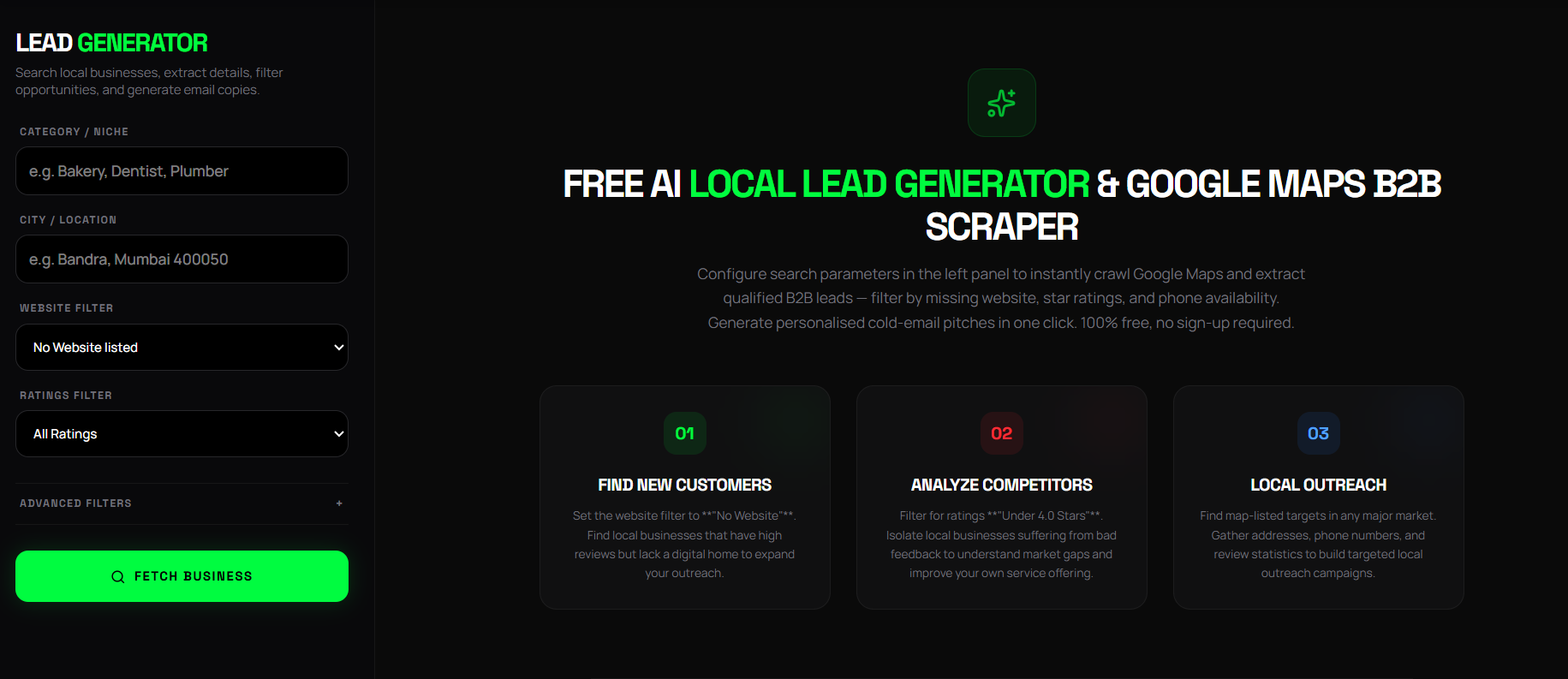
The beauty of this tool is the advanced filtering. If you're a web designer, you can tell it to only show businesses that don't have a website. If you're selling reputation management services, you can filter for businesses with ratings under 3.5 stars. It does the heavy lifting for you.
Step 3 — Extract and Export to CSV
Once you hit "Fetch Business," the tool works its magic. Within seconds, it will return a list of local businesses matching your exact criteria. You get everything you need to start your outreach campaign.
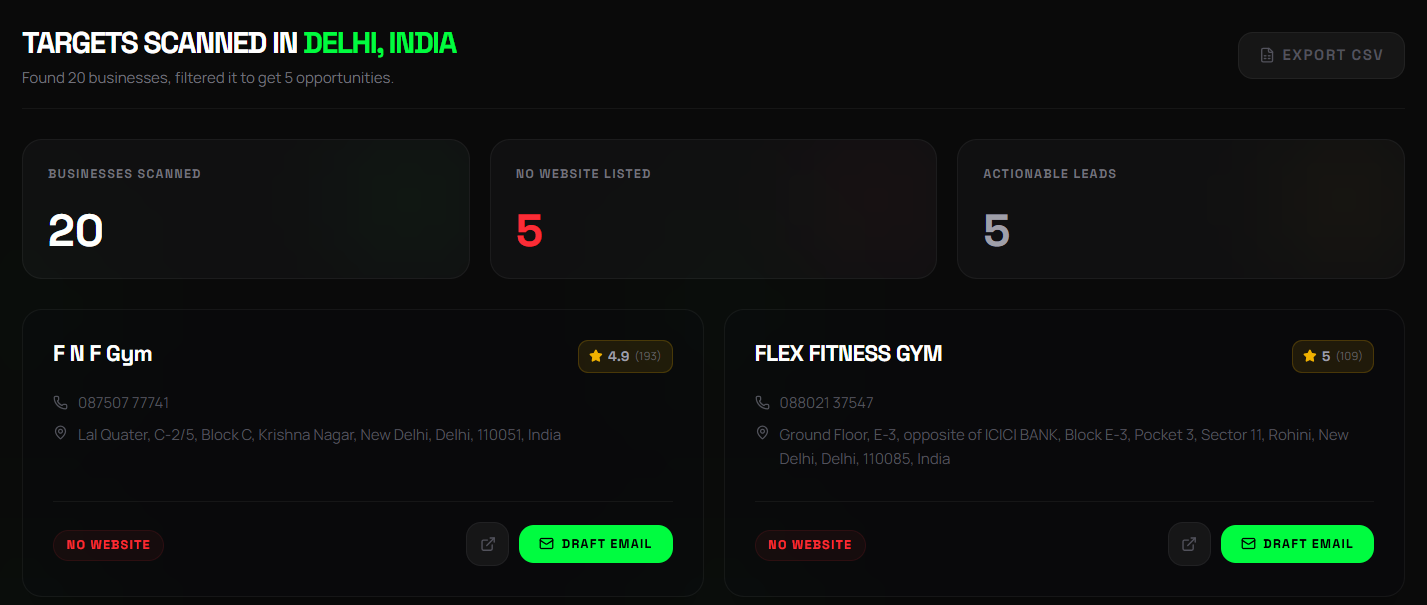
You'll see the business name, their current Google rating, total number of reviews, full address, phone number, and whether or not they have a website. From here, you have two options:
- 1. Direct Outreach: Click the "Draft Email" button on any card. The AI will analyze the business data and instantly write a personalized cold email tailored to that specific company.
- 2. Bulk Export: Need the raw data for your CRM or a bulk cold email campaign? Just click the Export CSV button at the top right. It instantly downloads a clean spreadsheet of all your newly generated leads.
Why This Beats Buying Stale Data Lists
Many businesses resort to buying large lists of leads from data brokers. This is almost always a mistake. Here's why extracting your own fresh data directly from Google Maps is vastly superior:
1. Data Accuracy is 100% Live
Purchased lists go stale fast. Businesses close, change phone numbers, or build websites. When you extract data live from Google Maps, you're getting information that was accurate as of the exact second you clicked "Fetch."
2. Hyper-Relevant Targeting
Brokers sell generic lists like "10,000 Plumbers in the US." With our free extractor, you can build micro-lists like "Plumbers in Austin with less than 4 stars and no website." Hyper-targeted lists always convert higher.
3. It Protects Your Email Deliverability
Sending cold emails to outdated, bought lists results in high bounce rates. High bounce rates destroy your email domain reputation, sending your future emails straight to the spam folder. Fresh data protects your domain.
How to Use Your New Business List Effectively
Now that you have a high-quality list of Google businesses, what do you do with it? The secret to cold outreach is personalization at scale.
Don't just blast a generic message to the entire CSV. Use the data points you extracted to personalize the message. For example, if you notice a business has a 4.9-star rating but no website, mention that!
"Hey [Name], I saw [Business Name] is crushing it with a 4.9 rating on Google Maps, but I couldn't find your website. Are you currently taking on new customers?"
This proves you aren't just a bot sending mass emails. It shows you actually looked at their business profile. When you combine high-quality, fresh data with personalized outreach, your response rates will skyrocket.
Stop paying for overpriced scrapers and stale data lists. Start generating your own highly targeted, real-time business lists today using our completely free Google Maps extraction tool.
Try the Free Lead Generator
Find local businesses in your city in under 60 seconds. No sign-up, no credit card required.
Want these results for your business?
Stop reading and start building. Partner with THE BRAND SPHERE to transform your digital presence.
Book a Strategy Call