How to Find Local Businesses Without a Website
Every freelancer and agency eventually hits the same wall: where do I find clients? Cold DMs get ignored, referrals dry up, and paid ads eat your margin before you've even closed a deal. There's a better way — and it's completely free.
This guide shows you exactly how to find local businesses without a website using Google Maps data, filter them for the highest-value prospects, and pitch them in a way that actually gets replies.
Why "No Website" Is the Perfect Lead Signal
A business without a website is not a failing business — it's often a thriving local business that simply hasn't gone digital yet. Think about it:
- → They're already generating revenue — they can pay you.
- → They clearly understand the value of local presence (they're on Google Maps).
- → They have a concrete, obvious gap you can fix — no explanation needed.
- → Your pitch practically writes itself: "I noticed you don't have a website..."
Compare this to cold-emailing a random company from a LinkedIn database — you have no idea if they need what you offer, if they can afford it, or even if their contact info is current. A no-website Google Maps lead is pre-qualified by default.
Step 1 — Find Businesses Without a Website on Google Maps (Free)
You could manually open Google Maps, search for businesses, click each one, and note down which ones have no website listed. For 5 leads, that takes 30 minutes. For 50 leads, that's your entire afternoon gone.
A faster approach: use BSG AI Free Lead Generator — a free tool that queries Google Maps in real-time and filters results to show only businesses without a website listed. Here's how:
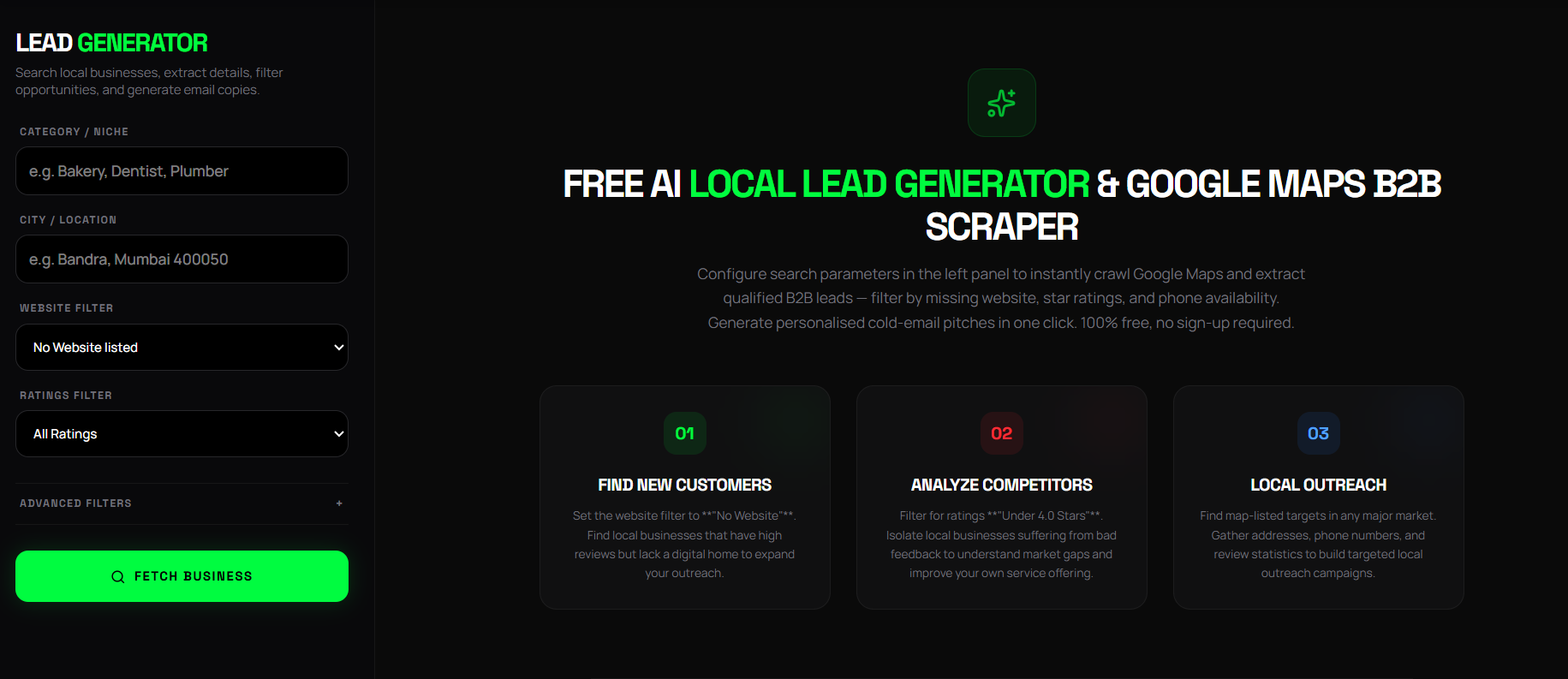
Enter the business category
Type the niche you want to target — e.g. Restaurant, Dental Clinic, Gym, Real Estate Agent, Law Firm. The tool gives AI-powered suggestions as you type.
Enter your target city
Type any city, neighbourhood, or area — Mumbai, Connaught Place Delhi, Koramangala Bangalore. Google Places autocomplete handles precise geocoding.
Set Website Filter to "No Website Listed"
This is the key filter. It tells the tool to only return businesses with no website on their Google Maps profile — your highest-value prospects.
Click "Fetch Business" and export to CSV
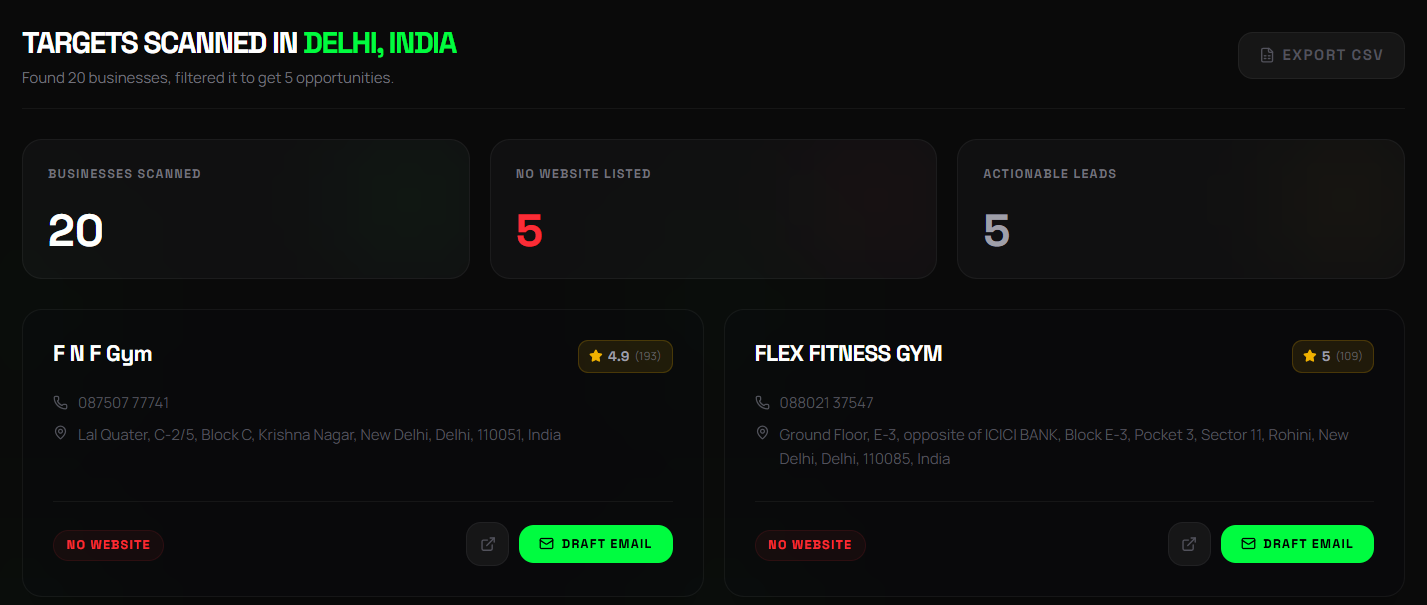
The tool returns up to 60 businesses with names, phone numbers, addresses, and Google Maps links. Download the CSV and you have a ready-made prospect list.
Step 2 — Qualify Your Leads (Don't Pitch Everyone)
Not every business without a website is worth pursuing. Use these quick qualification signals before you invest time in a pitch:
✓ Good Signs
- → 4.0+ star rating (customers love them)
- → 20+ reviews (established business)
- → Phone number listed (reachable)
- → Physical address (brick-and-mortar)
✗ Skip These
- → Under 2.0 stars (reputation problem)
- → 0–2 reviews (may be newly opened or closing)
- → No phone number listed
- → Category doesn't match a web-needing business
The BSG AI tool lets you stack filters — set a minimum review threshold and a rating filter alongside the no-website filter, so you only see businesses that are both established and web-less.
Step 3 — Write the Perfect Cold Pitch
The most common mistake agencies make is leading with their services. Don't say: "Hi, we build websites." Instead, lead with the specific gap you found:
Example Email — Restaurant Without Website
Subject: Website for [Restaurant Name] — Quick Question
Hi [Restaurant Name] Team,
I came across your Google Maps profile while looking for restaurants in [City] — your 4.6-star rating is impressive! I noticed you don't have a website listed, which means customers who want to check your menu or book a table online can't find you easily.
We build mobile-first restaurant websites with online menus and table booking — I'd love to put together a free mockup homepage for [Restaurant Name] to show you exactly what's possible. No obligation.
Would you have 5 minutes for a quick call this week?
Best,
[Your Name]
Notice what makes this work: it's specific (mentions their rating), empathetic (acknowledges the gap without being condescending), and low-friction (offers a free mockup, not a sales call).
The BSG AI Lead Generator has a built-in "Draft Email" button on each lead card that auto-generates a personalised pitch based on the business's rating and website status — saving you the writing time entirely.
Step 4 — Follow Up Systematically
Industry data shows that 80% of sales require 5+ follow-ups, yet most people give up after one. Here's a simple 5-day sequence that works for local business outreach:
Send the initial email with the free mockup offer.
Send a WhatsApp message to the phone number listed: "Hi, sent you an email about a website for [Business] — did it reach you?"
Send a brief email reply to your original: "Following up — happy to share the mockup if you'd like to take a look."
Final follow-up: "Closing the loop — let me know if the timing isn't right and I'll check back in a few months." Then mark as inactive and move on.
What Results Can You Realistically Expect?
Based on agency industry benchmarks for cold local outreach:
5–15%
Email reply rate for personalised no-website pitches
20–30%
Of replies convert to a discovery call
1–2
Clients per 50-lead batch for a strong offer
50 leads takes about 10 minutes to generate and 1–2 hours to email. If your average web design project is ₹25,000–₹80,000, that's a meaningful return on a few hours of work — done once a week.
The Free Tool That Does the Hard Part
Stop paying for data. Try the Free Lead Generator now and start building your client roster today.
Try the Free Lead Generator
Find local businesses in your city in under 60 seconds. No sign-up, no credit card required.
Want these results for your business?
Stop reading and start building. Partner with THE BRAND SPHERE to transform your digital presence.
Book a Strategy Call